


Performance: Take-off and Climb Calculations in Real Conditions

Dear pilots, student pilots and microlight enthusiasts,
Flight preparation is a crucial moment for every pilot. You are required to determine take-off distances and the rate of climb according to actual conditions, and to check that the runway is long enough… We all know these calculations, but let’s be honest: getting out the paper charts and drawing a line in a cramped cockpit at 35°C on a high-altitude strip is never a pleasure!
An app that evolves
Amenai technologies, a company specialising in digital aeronautical tools, has just launched the second version of its app: Performance. The project was co-initiated by Alexandre MENAI, president of amenai technologies, and Xavier ULLIANA, president of the CRULM Sud.
The first version, released last year, has been downloaded more than 6000 times, showing a real need among pilots for this type of tool. The app is available on Android and iOS, and works partially even offline.
How the app works
Performance automatically calculates four parameters:
Adjusted take-off distance – By entering your manufacturer’s take-off distance (in standard conditions), the app calculates the actual distance needed for the current altitude and temperature.
Corrected rate of climb – Density altitude has a major impact on climb performance. Performance shows the actual rate of climb compared with standard conditions.
Runway usage – A percentage indicator shows what portion of the runway will be used.
Density altitude – Calculated automatically using the standard ISA formula.
The algorithm used is based on the Koch curve with validated correction factors. Results are displayed in real time.
Database and geolocation
The app includes more than 29 000 airfields. You can search by ICAO code (LF1857, LFPX...) or by name. Airfields within 100 NM are displayed if you enable geolocation.
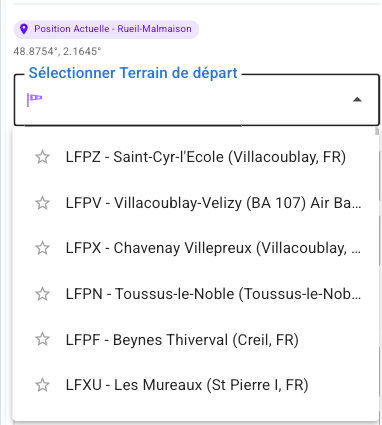
Estimates of the selected aerodrome’s elevation and the current temperature are pre-filled automatically via the Open-Meteo weather API. You are required to check these figures for the calculations.
You can create a favourites list for your usual airfields.
If you allow GPS access, the app can calculate performance directly at your current position, with estimated elevation and estimated local temperature.
Interface and indicators
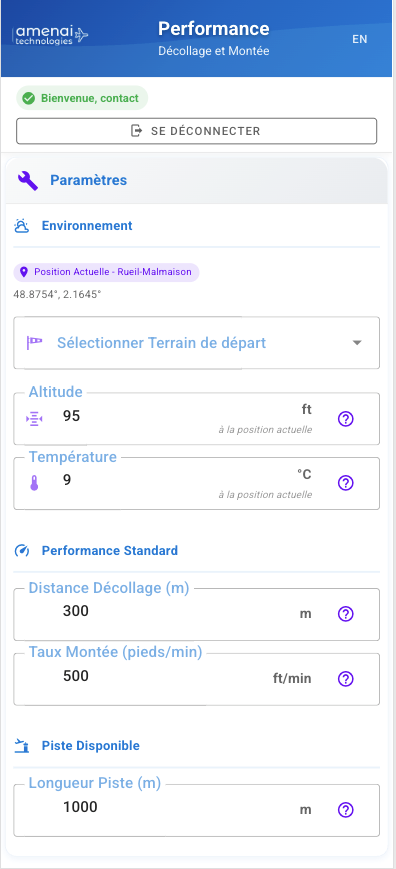
The main screen has three sections:
-
Settings: Airfield selection
-
Environment: Altitude and temperature
-
Standard Performance: Manufacturer data (take-off distance and rate of climb)
A fourth section lets you enter the available runway length.
The app uses a colour code:
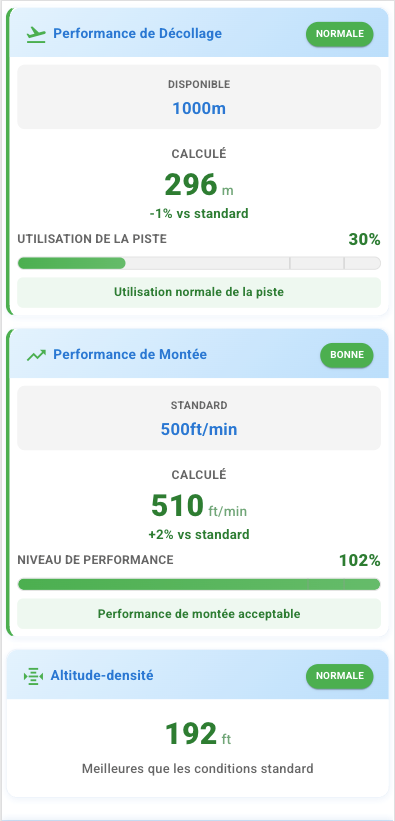
NORMAL – Safe operating conditions. Example: density altitude of 192 ft.
GOOD – Better than standard performance. Example: 510 ft/min calculated against 500 ft/min standard (+2%).
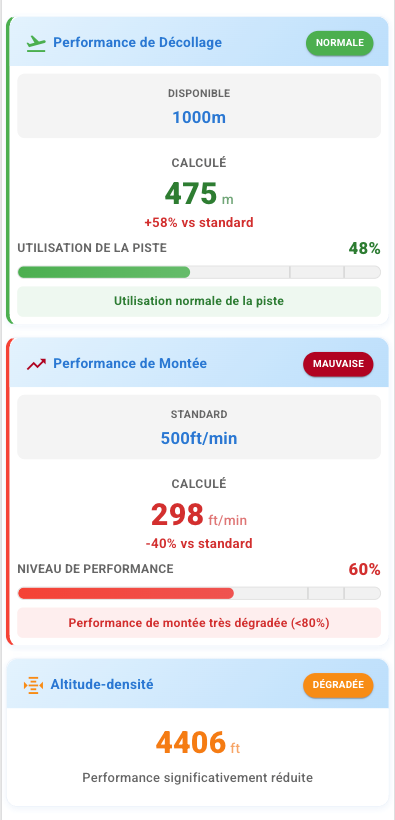
DEGRADED – Reduced performance. Example: density altitude of 4406 ft with the message “Performance significantly reduced”.
POOR – Conditions requiring the flight to be reconsidered. Example: 298 ft/min against 500 ft/min standard (-40%), with the alert “Climb performance very degraded (<80%)”. The app recommends waiting for better conditions when climb performance is below 80%.
Saving and compatibility
Settings (take-off distance, rate of climb, runway length, favourite aerodromes) are saved automatically. This function requires cookies and local storage to be enabled in the browser.
The app is available in French and English, with automatic language detection.
Feedback from the field
Xavier ULLIANA, co-initiator of the project in 2024 and president of the CRULM Sud, microlight instructor, and mountain pilot and member of the national Mountain Flying division, shares his experience:
“In the mountains and on the plain, density altitude is not a theoretical notion, it is a daily reality that governs every take-off. With Performance, I systematically check my calculations before operating from mountain landing strips (altisurfaces). The app instantly gives me a clear picture of my real performance.
What I particularly appreciate is being able to show my students concretely the impact of each parameter. When you train pilots who are going to fly, seeing that 5°C more can cut the rate of climb by 15% makes far more impression than a theory lesson.
The app does not replace training or experience, but it offers a quick, reliable calculation for preparation. I use it systematically for my flights and recommend it to my students, in addition, of course, to their training and their flight manual. But beware: Performance calculates your baseline data. Crosswind, runway slope, valley effects… All of that remains your responsibility to assess.”
The important limits
Amenai technologies is clear on this point: Performance is a decision-support tool. The pilot in command remains solely responsible for:
-
Checking all calculations
-
The final assessment of flying conditions
-
The final decision to take off
-
Compliance with the flight manual of his or her aircraft
The calculations provided are indicative and must be checked against the official flight manual of your aircraft.
Points to watch:
-
Always check the calculations against your manufacturer’s manual
-
Add appropriate safety margins
-
Take account of wind, runway slope and surface condition
-
If in doubt, wait for better conditions
Feedback from experience
We tested the app on several airfields. The calculations are quick and the interface remains readable. The density altitude display shows at a glance whether conditions are favourable or not. The visual alert system draws attention to degraded performance.
Automatic saving of settings avoids re-entering the manufacturer data on each use. The aerodrome database is handy for cross-country flying.
Point to note: like any digital tool, the app does not replace the pilot’s knowledge and reading of the flight manual. Parameters such as wind, slope or runway condition must be assessed separately and are not taken into account in the calculations.
In conclusion
Performance version 2 offers a quick way to calculate take-off and climb performance in real conditions. The app turns tedious calculations into an almost instant reading, while keeping the pilot responsible for his or her decisions.
The 6000+ downloads of the first version show that pilots are looking for this kind of tool. Version 2 brings improvements based on that user feedback.
A tool worth trying for those looking to digitise their flight preparation, bearing in mind that it is an aid and not a substitute for the pilot’s judgement and the flight manual. It is offered at a symbolic price of €1, essentially to cover the costs of external maintenance licences and hosting.
Happy flying to all!
Performance is in the testing phase and will soon be available (within about a week) on Google Play for Android at the following link: https://play.google.com/store/apps/details?id=net.amenai.performance
To get free access during the testing phase, contact amenai technologies at contact@amenai.net to register.
For Apple (iOS): the current version (1) of Performance is available on Apple (iOS): https://apps.apple.com/fr/app/aircraft-perf-calculator/id6541753665
Version 2 of Performance will be available in a few days and will replace the first version (you can update your current version as soon as it becomes available).